
How to Choose a CRM: The 8-Step Selection Framework for SMBs
Introduction: Why Most CRM Selections Fail Small Businesses
Every month, dozens of founders reach out to me with the exact same regret: "Amit, we spent 8 months setting up our CRM, and our team hates it. Nobody logs their calls, our data is a mess, and we are paying thousands every quarter for a system we barely touch."
When you search online for advice on choosing software, you find endless generic listicles. These articles declare one platform "the undisputed best CRM" simply because that vendor pays the highest affiliate commission.
Here is the candid reality from someone who configures these systems every day: there is no single best CRM for everyone. CRM fit is strictly contextual. It depends entirely on your business model, your sales motion, your team size, and your tech stack.
Choosing software should never be a game of guessing or buying into slick sales pitches. The financial risk of a monthly subscription is small, but the operational disruption of choosing the wrong platform can stall your company for years.
To eliminate the guesswork, I developed an objective 8-step CRM selection framework. This guide walks you through the entire evaluation process—from workflow discovery and cost analysis to weighted feature scoring and user adoption.
Disclosure: Some of the links in this guide are affiliate links. If you choose to subscribe to a platform through them, I may earn a commission at no extra cost to you. Vendor placement on this site is strictly editorial and data-driven; positions cannot be bought.
The True Costs of Choosing the Wrong CRM
Before examining the selection steps, it helps to understand what is truly at stake. Many founders assume that picking the wrong tool just means canceling a $30/month subscription.
In practice, software licensing fees represent only a small fraction of the true damage. A botched CRM implementation inflicts four severe compounding costs on an SMB:
| Impact Category | Operational Consequence | Business Toll |
|---|---|---|
| Direct Financial Cost | Unused licenses, custom migration scripts, and expensive required add-ons. | Thousands of dollars wasted on shelfware and consultant cleanup fees. |
| Time Drag & Delay | 6 to 12 months spent evaluating, configuring, and struggling with an ill-fitting tool. | Prolonged analysis paralysis and months lost from core business growth. |
| Productivity Loss | Clunky interfaces, confusing menus, and missing automations. | Sales reps rebel, abandon the CRM, and retreat into private spreadsheets. |
| Customer Experience Drop | Dropped follow-ups, untracked client requests, and fragmented communication. | Damaged brand reputation, missed sales quotas, and preventable client churn. |
Key Takeaway: With free trials and self-service onboarding, the immediate monetary risk of testing software is low. The real risk is time, team morale, and operational disruption. The framework below protects your most precious asset: your operating focus.
3 Ground Rules Before You Start Evaluating Software
Keep these three fundamental principles in mind throughout your selection process:
- Points of Parity vs. Points of Difference: Nearly every CRM handles contact records, activity reminders, and pipeline stages. Do not base your decision on table-stakes features. Focus on points of difference: specific industry workflows, API flexibility, and communication velocity.
- Contextual Fit Over Feature Lists: A feature is worthless if your team finds it too tedious to use. An intuitive tool with 80% of your ideal features will always outperform a complex enterprise platform that your reps refuse to update.
- CRMs Never Set Themselves Up: Software does not fix broken processes. You must define your sales stages and operational workflows before configuring the software.
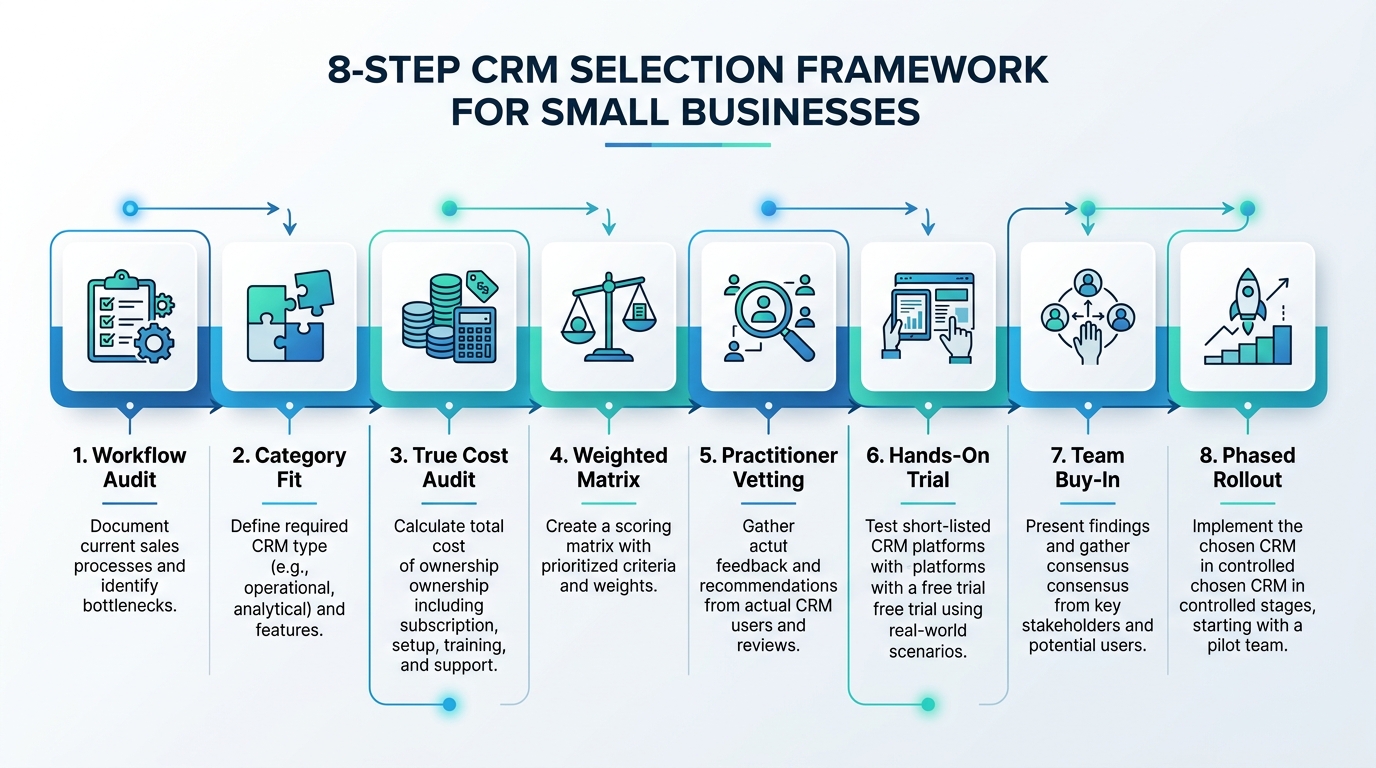
The 8-Step CRM Selection Framework
The table below summarizes the complete selection journey. Follow these stages in sequence rather than jumping straight into software demos.
| Step | Phase | Core Operational Focus | Key Deliverable |
|---|---|---|---|
| 1 | Discovery | Audit internal workflows and primary data entities. | Documented requirements & user pain points. |
| 2 | Categorization | Match your business model to software architecture. | Identified CRM category fit. |
| 3 | Cost Audit | Calculate true cost of ownership & pricing models. | TCO budget including seat minimums & add-ons. |
| 4 | Scoring | Build a weighted evaluation matrix. | Completed CRM scoring spreadsheet. |
| 5 | Community | Crowdsource unfiltered practitioner insights. | Vetted shortlist of 2 to 3 candidate CRMs. |
| 6 | Testing | Run real operational scenarios in free trials. | Verified hands-on pilot results. |
| 7 | Buy-In | Involve front-line stakeholders for feedback. | Full team adoption commitment. |
| 8 | Rollout | Configure fields, migrate clean data, and train users. | Live, operational CRM with internal SOPs. |
Step 1: Audit Your Daily Workflows & Core Transaction Unit
The foundation of choosing the right software is understanding how your business actually runs. Do not start by browsing vendor feature pages. Start by interviewing the team members who interact with prospects and clients daily.
Identify your business's primary transaction unit:
- If your revenue centers on moving qualified deals through stages, your core unit is an Opportunity (you need a sales pipeline tool).
- If you dispatch technicians to physical sites, your core unit is a Work Order or Job Ticket.
- If you run client deliverables and retainer scopes, your core unit is a Project or Task Board.
- If you manage appointments and clinical encounters, your core unit is a Patient Encounter or Session.
Next, list the critical tools your CRM must connect with:
- Email & Calendar: Google Workspace or Microsoft 365 bidirectional sync.
- Calling & Telephony: Native calling or specialized phone integrations (review our vetted list of CRM telephony add-ons).
- Automation Engines: Reliable webhooks or native integrations with Zapier, Make, or n8n.
- Accounting & Billing: Quickbooks, Xero, or Stripe connectivity.
Step 2: Identify Your CRM Category & Architectural Fit
Forcing a generic sales pipeline tool onto a clinical practice or field service team is the fastest path to software failure. CRM software divides into distinct operational architectures.
Before evaluating individual brand names, determine which CRM category matches your delivery model:
- Sales CRMs: Engineered for outbound prospecting, deal pipelines, and sales activity tracking (e.g., Pipedrive, Close, HubSpot).
- Client Portal CRMs: Engineered for client-facing collaboration, intake forms, and asset sharing (e.g., Copilot, Bonsai).
- Home Services CRMs: Built for field service scheduling, dispatching, and mobile job invoicing (e.g., Jobber, Housecall Pro).
- Project Management CRMs: Designed for agencies where deal closing immediately flows into task execution (e.g., Monday CRM, ClickUp).
For a deep dive into each category's database architecture, read my detailed guide to the 9 practical types of CRM software.
If you are uncertain which category matches your operation, run through our interactive CRM Finder to filter tools by business model.
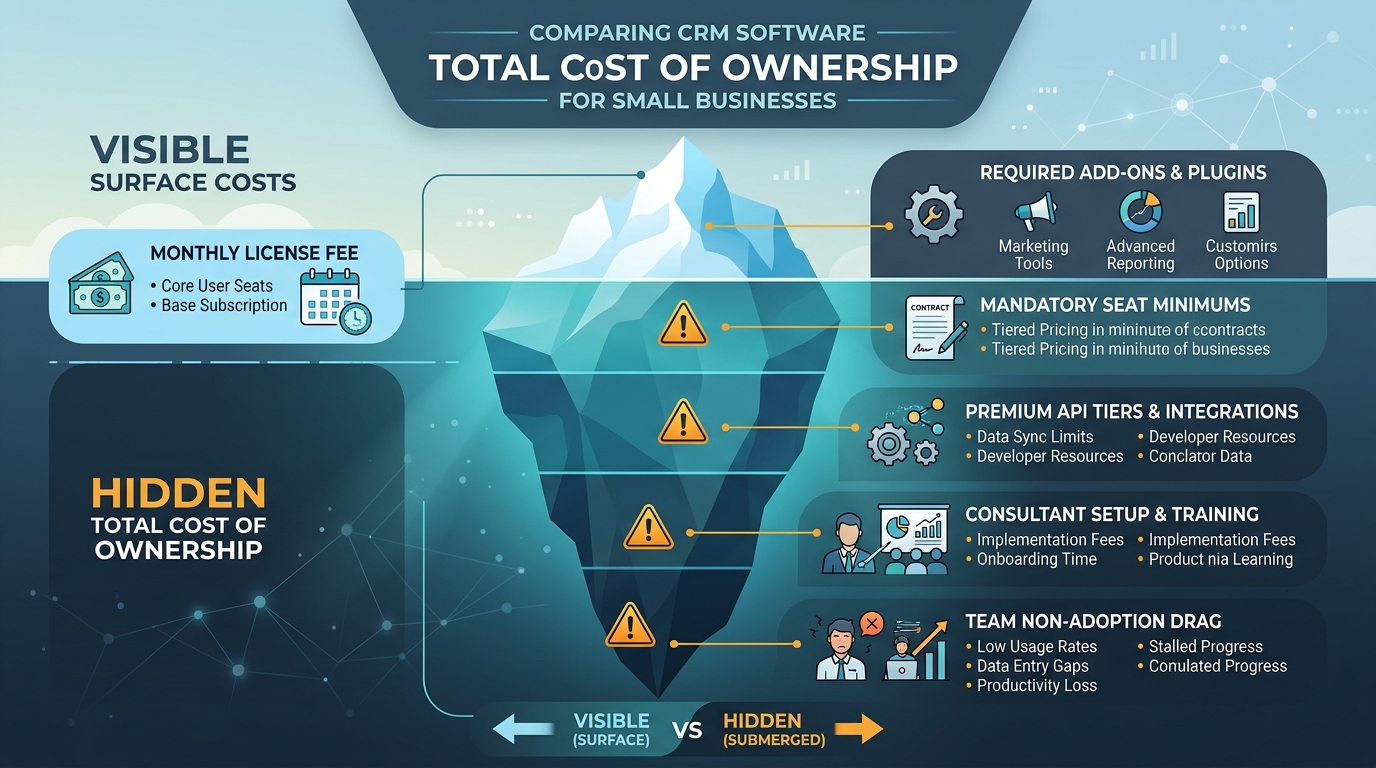
Step 3: Uncover the True Cost of Ownership & Pricing Traps
Vendor pricing pages are notoriously deceptive. A platform advertising "$15 per user per month" can easily cost you $150 per user once you factor in mandatory tier upgrades and essential features.
When auditing pricing, watch for these common commercial structures:
| Pricing Archetype | How It Works | Common Gotchas to Watch For |
|---|---|---|
| Pure Seat-Based | Pay a transparent fee per user each month (e.g., Pipedrive, Close). | Tier restrictions on custom fields or workflow automation limits. |
| Enforced Seat Minimums | Per-user rate advertised, but requires purchasing 3+ or 5+ seats minimum (e.g., Monday CRM). | Solo operators or 2-person teams pay double or triple the advertised entry cost. |
| Bundled Base Seats | Fixed plan fee includes a base allowance (e.g., 2 or 5 seats), extra seats cost extra. | Adding one user beyond the package limit can trigger an expensive plan jump. |
| Contact / Volume Tiers | Pricing scales automatically based on contact records or email sends (e.g., HubSpot, ActiveCampaign). | Costs can multiply rapidly as your marketing database expands. |
Always check whether critical capabilities—such as e-signatures, advanced reporting, or phone dialers—require extra paid add-ons. You can compare plan tiers, seat minimums, and hidden fees across dozens of platforms in our CRM directory.
Step 4: Build Your Weighted CRM Evaluation Matrix
Do not rely on subjective impressions or emotional reactions after watching a flashy product demo. An objective selection requires a weighted evaluation matrix.
A weighted matrix assigns a multiplier to each requirement based on its operational importance to your business:
- List Your Use Cases: Add your business requirements as rows (e.g., "Two-way email sync", "Mobile app deal updates", "Zapier integration", "Affordable monthly seat pricing").
- Assign Weight Multipliers (1 to 5): Rate how critical each requirement is. A non-negotiable requirement gets a 5; a nice-to-have capability gets a 1 or 2.
- Score Candidate CRMs (1 to 10): Grade each candidate platform on how effectively it handles that specific requirement.
- Calculate Total Weighted Score: Multiply each score by the weight and sum the results to see the objective winner.
Sample Weighted Evaluation Matrix
| Evaluation Criteria | Importance Weight (1–5) | Candidate A (e.g., Pipedrive) | Weighted Score A | Candidate B (e.g., HubSpot) | Weighted Score B |
|---|---|---|---|---|---|
| Pipeline Visual Clarity | 5 | 9 / 10 | 45 | 8 / 10 | 40 |
| Two-Way Email Sync | 4 | 9 / 10 | 36 | 9 / 10 | 36 |
| Affordable Seat Scaling | 5 | 8 / 10 | 40 | 4 / 10 | 20 |
| Advanced Marketing Automation | 2 | 5 / 10 | 10 | 9 / 10 | 18 |
| Mobile App Ease of Use | 3 | 8 / 10 | 24 | 7 / 10 | 21 |
| Total Weighted Score | — | — | 155 | — | 135 |
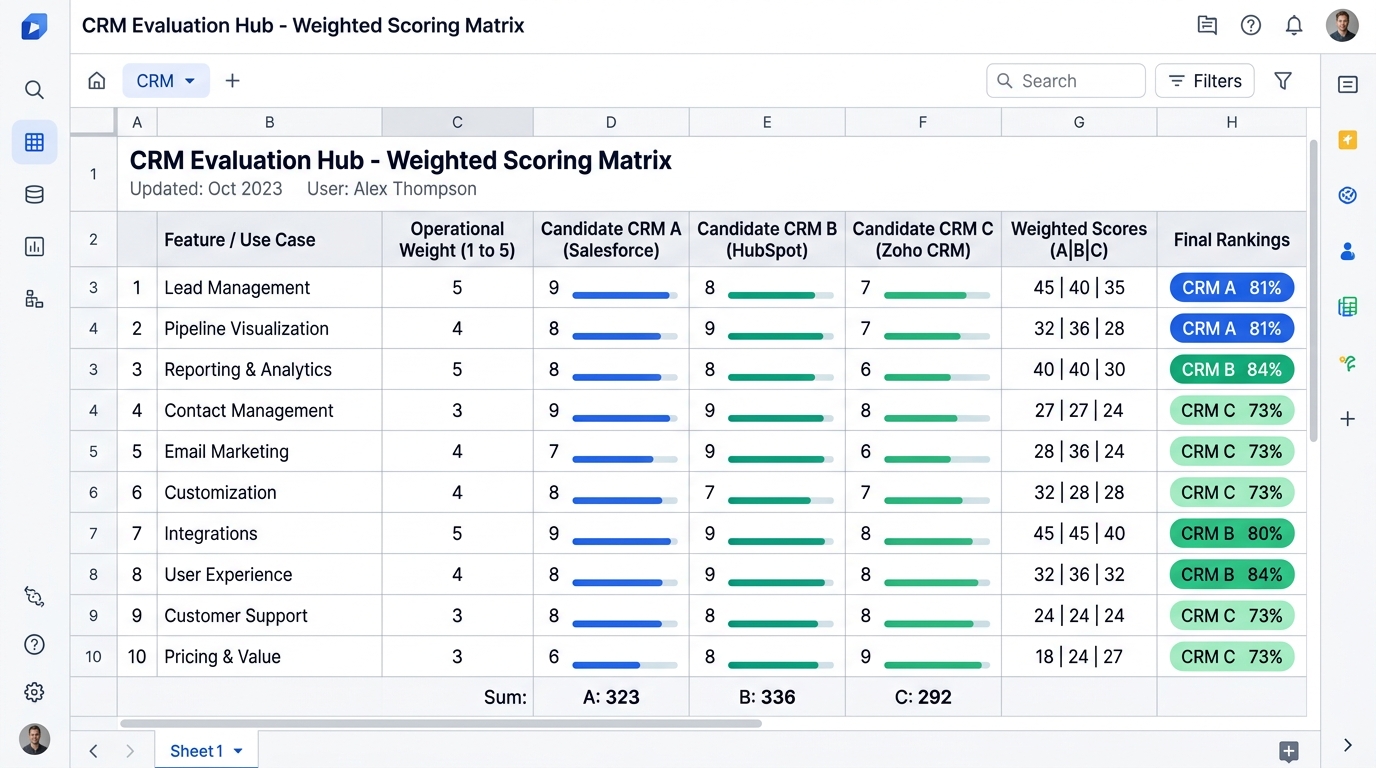
To save you hours of formatting, I have created a ready-to-use template. You can request a free copy of the CRM Selection Framework spreadsheet and customize it for your team.
Step 5: Crowdsource Unfiltered Feedback from Real Practitioners
Once you have defined your requirements and weights, use your matrix to question real practitioners rather than relying on vendor sales pitches. Traditional software review directories like G2, Capterra, and TrustRadius have become heavily commercialized. Many positive reviews are incentivized with gift cards, while sponsored vendors capture top billing.
To get the unvarnished truth about a platform's quirks, consult real practitioners:
- Community Forums: Search Reddit communities like r/sales, r/smallbusiness, and r/CRM for real user complaints about software limitations.
- Dedicated User Communities: Explore official vendor communities (such as the Pipedrive Community) to see what workarounds active users rely on.
- Peer Networks: Ask fellow founders in your niche what tool they use and what they dislike most about it.
If you want an objective diagnostic of your specific situation without sales bias, explore our CRM Recommendation Wizard or schedule a free 1-on-1 CRM selection call.
Step 6: Test Real Operational Scenarios in Free Trials
With insights from practitioners, narrow your list down to a shortlist of 2 or 3 candidate platforms. Never evaluate software by simply clicking through empty sample dashboards. A CRM looks pristine when it is populated with fictional demo data, but real workflows reveal software bottlenecks.
When you start a 14-day or 30-day trial, run this 5-day operational stress test:
- Import 25 Real Records: Upload a CSV of 25 actual contacts and recent deals. Check how easily custom fields map and whether the import tool flags duplicates.
- Connect a Live Email Inbox: Sync a real mailbox. Send 3 test emails from the CRM and verify whether incoming replies log automatically to contact timelines.
- Move Deals Through Stages: Create custom pipeline stages that reflect your sales motion. Test dragging deals, scheduling follow-up activities, and logging notes.
- Test Mobile Usability: Download the vendor's iOS or Android app. Try updating a deal, logging a phone call, and searching for a contact while away from your desk.
- Simulate a Handoff: If you have a second team member, assign them a deal and verify how notifications and task reminders appear.
For head-to-head comparisons of how top platforms perform under real-world testing, check our direct matchup between Pipedrive vs HubSpot.
Step 7: Involve Front-Line Stakeholders for User Buy-In
Before signing an annual contract or committing your company's workflows, validate your trial findings with the people who will live inside the tool every day. The best CRM on paper is worthless if your sales reps refuse to use it. Executive leadership often selects software based on executive reporting dashboards, while ignoring the daily administrative burden placed on front-line reps.
To ensure lasting user adoption:
- Form a Small Evaluation Committee: Involve one sales rep, one customer service agent, and one operations lead throughout trial testing.
- Host a Live Workflow Session: Have your reps perform standard daily tasks in the candidate platforms. Ask them which interface feels faster and more natural.
- Address Hesitations Early: If reps feel a system requires too many mandatory clicks to log an activity, find out if that workflow can be simplified with automation.
When reps feel ownership in the selection process, adoption rates soar once the software launches.
Step 8: Plan Phased Implementation, Data Hygiene & Training
Selecting your CRM is only half the battle. Successfully transitioning your company into the new platform requires disciplined implementation.
Implementation consists of three core phases:
1. Configuration & Pipeline Architecture
Set up custom fields, stages, user permissions, and automated reminders before inviting your broader team. Keep your pipeline lean: 4 to 6 clearly defined stages are far more effective than 12 confusing stages.
2. Data Migration & Cleanup
Never migrate dirty data into a brand new CRM. Clean your spreadsheets beforehand:
- Deduplicate contacts by email and phone number.
- Remove defunct records and unresponsive leads older than 24 months.
- Standardize phone formatting, industry tags, and country fields.
3. Role-Based Training & Internal SOPs
Hold focused training sessions tailored to specific roles rather than generic hour-long overview lectures. Create a short, 2-page Standard Operating Procedure (SOP) document outlining company expectations:
- When must a deal be created?
- What constitutes an updated deal?
- How quickly must new inbound leads be contacted?
For a comprehensive implementation checklist, read our complete CRM implementation guide for small businesses and learn how to track leading adoption indicators in our guide to measuring CRM ROI.
Interactive Tools to Support Your CRM Selection
To accelerate your research, use these free interactive tools across our platform:
- Do I Need a CRM? Assessment: Determine whether your business actually needs a dedicated CRM or simpler operations tooling.
- CRM Recommendation Wizard: Answer 5 quick questions about your team size, sales motion, and budget to get an instant tailored recommendation.
- Interactive CRM Finder: Filter dozens of vetted platforms across categories, pricing models, and specific feature sets.
- Sales CRM Landscape Hub: Review in-depth profiles, pricing breakdowns, and real-world trade-offs for leading sales platforms.
Frequently Asked Questions (FAQ) About Choosing a CRM
What is a CRM selection framework?
A CRM selection framework is a structured, objective process for evaluating software based on business requirements, weighted use-case scoring, and operational fit rather than marketing claims. It helps founders avoid expensive software mismatches and prolonged implementation delays.
How long should it take for a small business to choose a CRM?
For a typical team of 2 to 25 people, the selection process should take 2 to 4 weeks. This provides sufficient time to audit workflows, build a weighted matrix, and conduct a hands-on 5-day trial test without causing analysis paralysis.
Should I choose an "all-in-one" platform or a specialized CRM?
All-in-one platforms promise convenience, but their individual modules (marketing, sales, support) are often shallow or demand steep tier upgrades. Small businesses are usually better served by choosing a best-of-breed CRM with strong native integrations and modern automation webhooks.
How do I evaluate a CRM during a free trial?
Never evaluate software using empty demo databases. Import 20 real prospect records, connect a live email inbox, configure your actual pipeline stages, and test day-to-day usability on both desktop and mobile apps.
What should I do if my team refuses to adopt our new CRM?
Non-adoption usually stems from excessive data entry requirements or lack of involvement during selection. Simplify required fields, automate repetitive administrative tasks, provide role-based training, and establish clear operational incentives for maintaining pipeline hygiene.
Conclusion: Take the Next Step in Your CRM Journey
Choosing a CRM does not have to be an overwhelming, months-long ordeal. By anchoring your decision in real daily workflows and using an objective scoring matrix, you can select software with complete confidence.
Remember: the goal is not to find a perfect, mythical tool that solves every business problem overnight. The goal is to choose a reliable, intuitive system that your team loves using every day.
Ready to start evaluating candidate CRMs?
- Grab your copy of the free CRM Selection Framework spreadsheet.
- Explore our curated CRM directory to compare pricing, seat minimums, and vetted perks.
- If you want a tailored, objective perspective on your software stack, book a free 1-on-1 CRM selection call.
Table of Contents
Need Help Selecting the Right CRM?
Every business has nuanced workflows and unique tool stacks. Book a free 1-on-1 consultation to evaluate your options objectively—no sales pitches, just candid operator advice.
Help Fellow Businesses Choose the Right CRM
Have experience using these platforms? Share your honest pros, cons, and workflow insights to help other businesses make an informed choice.
⚡ Takes 2 minutes • 🔒 Verified reviews only • 🤝 Help the community